
How to Check if a Flight Is Delayed (Often Before the Airline Tells You)
Airline status pages are often the last to admit a delay. The board says On time until twenty minutes before departure, then jumps to Delayed. With a live flight tracker you can usually see the delay coming much earlier, because you can see where the plane actually is.
Short answer: search the flight number on fly24.io to see its live position. If the flight hasn't left yet, find the aircraft that will fly it: when that plane is still in the air somewhere else close to your departure time, your flight will leave late. Always confirm delays and cancellations with the airline, since only it can change the schedule.
Why "On time" can be wrong
An airline's flight status is built from the schedule, then updated by staff when they know something has changed. A live tracker shows positions: where the plane is, how fast it's going and how far it is from the airport. The two often disagree:
- The schedule says the flight lands at 18:40, but the plane is still 600 km away at 18:00. It will be late, whatever the board says.
- The schedule says Delayed, but the plane is already descending. You may still make the pickup on time.
Both are useful. Use the airline for the official word (gate, cancellation, rebooking) and the live map for what's really happening.
Method 1: track the flight itself
This works once the flight is airborne.
- Open fly24.io and type the flight number from the ticket, such as PK301, EK623 or BA259.
- Tap the result. The panel shows altitude, speed, route and the estimated time left until landing.
- Compare that estimate with the scheduled arrival. A gap of 15 minutes or more means the flight is running late (or early).
The estimate is based on the plane's real position and speed, so it becomes more accurate as the flight gets closer. Once a plane starts descending, landing is usually 20 to 30 minutes away. More detail is in how to track a flight by flight number.
Method 2: track the incoming plane (the early warning)
Most delays start before your flight does. The aircraft that will fly you is usually finishing another flight first. If that earlier flight is late, yours will be too. Airline crews call this a "late inbound". In the United States, the Bureau of Transportation Statistics lists "late-arriving aircraft" as the largest single cause of delay minutes.
Here is how to spot it:
- Find the aircraft. Search your flight number on fly24 a few hours before departure. If it isn't flying yet, open the departure airport's page and look for the airline's planes on the ground, or search a recent flight with the same number.
- Open its history. In the flight panel, scroll to History and choose the This aircraft tab. It lists the recent flights fly24 has seen that plane make, with routes and times.
- Check where it is now. If the aircraft is still in the air on a different route, compare its estimated landing time with your departure time. Airlines need roughly 30 to 60 minutes on the ground between flights for a narrow-body like an A320, and more for a wide-body like a Boeing 777.
Example: your flight leaves Lahore at 15:00. At 13:30 you find that the plane due to operate it is still over Saudi Arabia, two hours from Lahore. It can't land before 15:30, so your departure will almost certainly be after 16:00, even if the board still says On time.
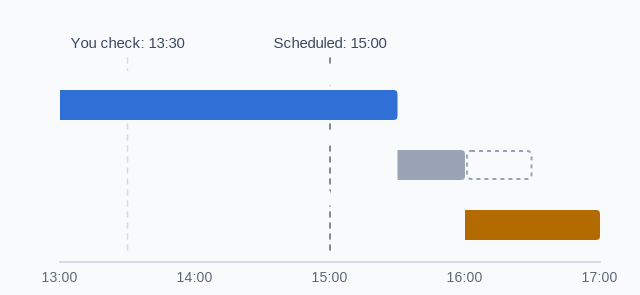
Airlines sometimes swap aircraft at the last minute, so treat this as an early warning, not a guarantee.
Method 3: watch the airport board
If you don't know the flight number, open the destination airport, such as Dubai (DXB) or Lahore (LHE). The Arrivals tab lists every plane flying towards it right now, with minutes to landing. A flight that should land in 20 minutes but is still an hour out is running late.
Where fly24 has a timetable for the airport, you'll also see scheduled times, delays, terminal and gate.
Has the flight landed?
Look for these signs on the flight panel:
- Altitude 0 and "on ground" at the destination airport.
- Speed dropping below about 30 knots: the plane is taxiing to the gate.
- The icon at the terminal on the map.
After landing, allow time for taxiing, getting off the plane, immigration and bags. For international arrivals that's usually 30 to 60 minutes before people come out. Read timing an airport pickup for the details.
Common reasons flights are delayed
| Cause | What you see on the map |
|---|---|
| Late incoming aircraft | Your plane is still flying another route near departure time |
| Bad weather at the destination | Planes circling or slowing down near the airport |
| Busy airspace | Planes lined up in a long, slow approach |
| Technical or crew problem | The plane sits at the gate with no movement |
| Diversion | The plane turns away and lands at a different airport |
What a tracker can't tell you
Be careful with predictions made only from the map. A live tracker can't see:
- Cancellations before they happen. The plane may simply never appear.
- The reason for a delay, or what compensation you're entitled to.
- Gate changes and rebooking options.
For those, check the airline's app, website or SMS updates. If a flight doesn't appear at all, read why some flights are missing.
Quick checklist
- Two to three hours before departure: find the incoming aircraft and check where it is.
- At departure time: search the flight number to see if it has taken off.
- In the air: compare the live landing estimate with the scheduled time.
- After landing: add 30 to 60 minutes for passengers to come out.
Open the live map and search your flight number to start.